Login
Client Area

Knowledgebase

Manage your HostFactor account, services, and support requests from one secure place.

How to change the FTP User Quota in cpanel? Print

  • 0

If you want to increase/decrease the FTP Quota or to use an "Unlimited" FTP Quota but also want to set a limit, then follow these steps to modify the FTP User quota.


1. Log into your cpanel account.
2. In the "Files" section, click on "FTP Accounts" Icon.



3. Under the "FTP Accounts" list, click on "Change Quota".
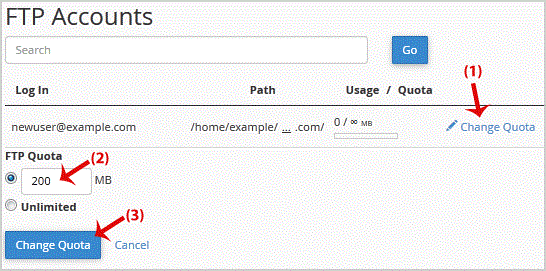


.. "Change Quota" babies.


Was this answer helpful?

« Back